
Your Data Goes Where You Go
Universal CSV import, full ZIP export, zero vendor lock-in
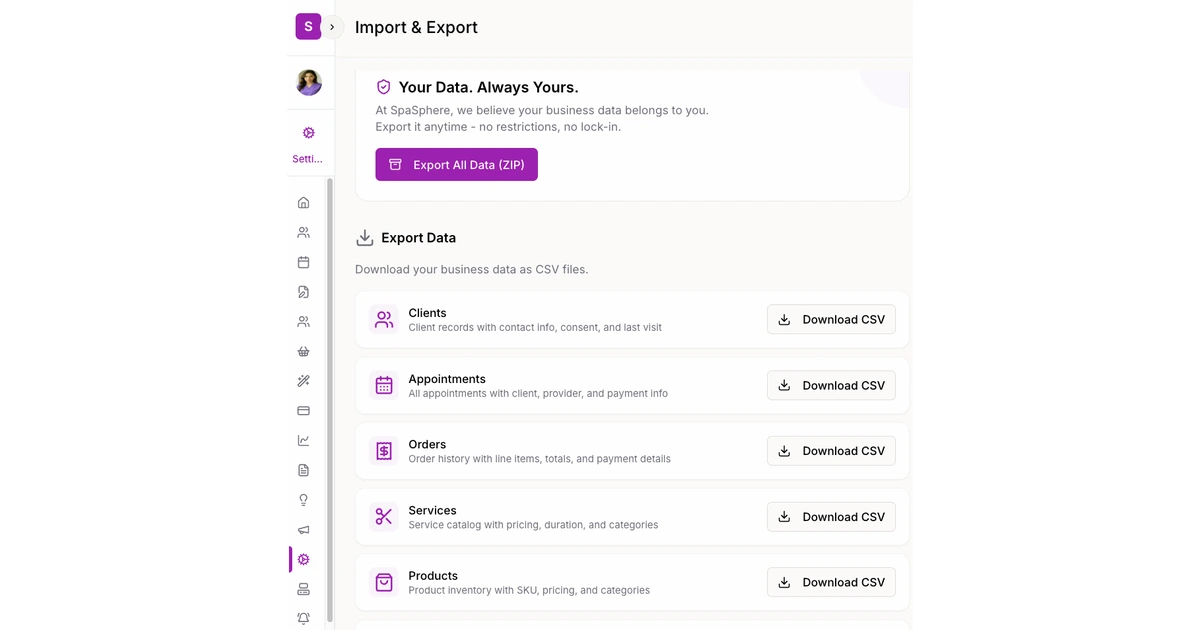
The biggest fear when switching spa software is losing years of client history, service records, and product catalogs. SpaSphere eliminates that fear. Our universal CSV importer handles clients (with notes, addresses, and consent fields), services, products, inventory, and appointments - five dedicated importers that map your columns and validate data before anything touches your account. And if you ever need to leave, full data export downloads everything as a ZIP file. Your data is always yours.
Why You'll Love It
Switch Without Starting Over
Import your entire client list - names, emails, phones, birthdates, notes, addresses, and consent preferences - in one upload. No retyping years of history.
5 Dedicated Importers
Separate importers for clients, services, products, inventory, and appointments. Each one understands its entity type and validates fields specific to that data.
Smart Column Mapping
Upload your CSV and SpaSphere suggests which columns map to which fields. Handles messy data, different naming conventions, and multiline fields without breaking.
Validation Before Anything Saves
Every row is validated before import. See exactly which records will succeed and which have issues - fix problems before they enter your system, not after.
Full Export, Anytime
Download all your data as a ZIP file whenever you want. Clients, appointments, services, products, notes - everything. No hoops, no support tickets, no waiting.
No Vendor Lock-In, Ever
We earn your business every month by being the best tool for the job, not by holding your data hostage. Import in, export out - your data stays yours.
How It Works
Export From Your Current Software
Download a CSV from your existing platform - Vagaro, GlossGenius, Square, or wherever your data lives. Most tools have an export option in settings.
Upload and Map Columns
Drop the CSV into SpaSphere's importer. It auto-detects common fields and lets you manually map anything it doesn't recognize. Preview the mapping before proceeding.
Validate and Import
SpaSphere validates every row and shows you a summary - successful records, warnings, and errors. Fix any issues, then import with one click. Everything saves atomically.
You're Up and Running
Your full client history, services, products, and inventory are in SpaSphere. Start booking appointments immediately - no data re-entry, no gaps in client records.
Ready to bring your data home?
Import everything in minutes, not days. Start your $1 trial today.
✓ Cancel anytime · ✓ White-glove setup included · ✓ No commitment